Most business owners I work with know their website needs some kind of maintenance. What they don’t know is what actually needs updating, how often, and what breaks when they leave it too long.
I’ve been building and maintaining WordPress websites in Kingston for 18 years. In that time, I’ve had exactly one client site get hacked. I got an alert that the security plugin had been disabled, I logged in and managed to block them out before any damage was done. That’s not luck. That’s what happens when someone monitors your site properly and keeps everything updated.
Here’s what actually needs maintaining on your website, why it matters, and what happens when you skip it.
Website Maintenance: What Needs Updating
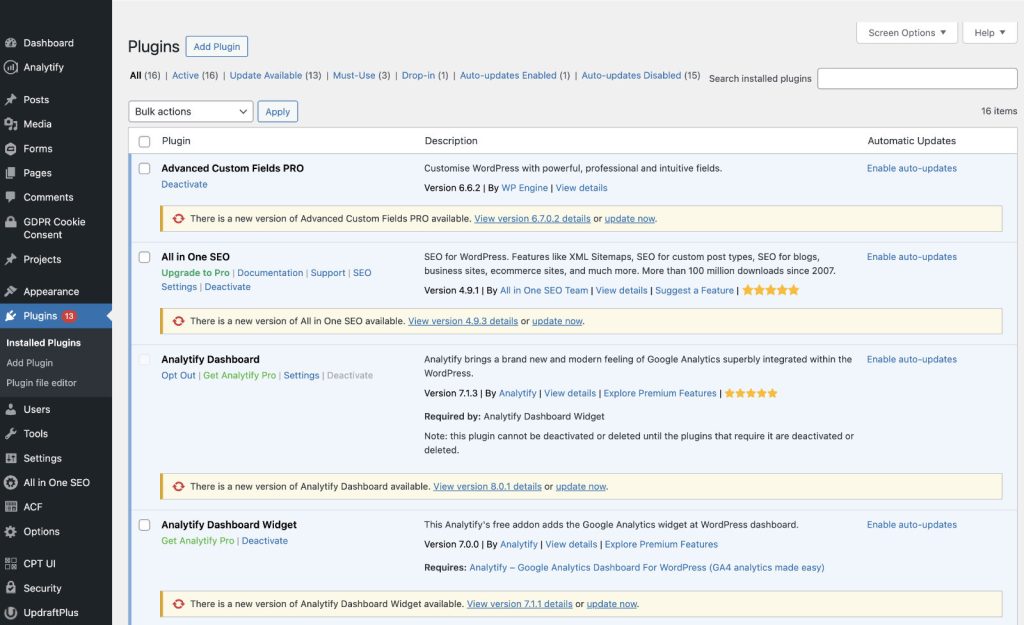
WordPress doesn’t sit still. Every week there are updates to WordPress itself, the plugins that add functionality to your site, and the theme that controls how it looks. These aren’t optional; they’re security patches, bug fixes, and compatibility updates that keep your site working.
The typical small business website I maintain has WordPress core, about 15 plugins, and a theme. That’s at least 17 different pieces of software that all need keeping up to date.
WordPress Core Updates: What to Do and How Often
- Monthly releases: Come out roughly once a month
- Security patches: Include critical fixes
- Major versions: Change how WordPress works
- Mandatory updates: Need to be applied whether they seem important or not
Plugin Updates: Why They Matter
- Frequent updates: Multiple per week on most sites
- Security patches: Fix vulnerabilities attackers actively exploit
- Bug fixes & compatibility: Ensures plugins work with new WordPress versions
- Critical updates: You can’t tell which updates matter by just looking
- Weekly discoveries: Hundreds of new plugin vulnerabilities appear each week
Theme Updates: Keep Your Site Compatible
- Less frequent but crucial: Ensures site stability and functionality
- PHP compatibility: Keeps the site working after server updates
- WordPress compatibility: Maintains support for major releases
- Functional impact: Controls site features, not just appearance
Security Monitoring: Protect Your Website Daily
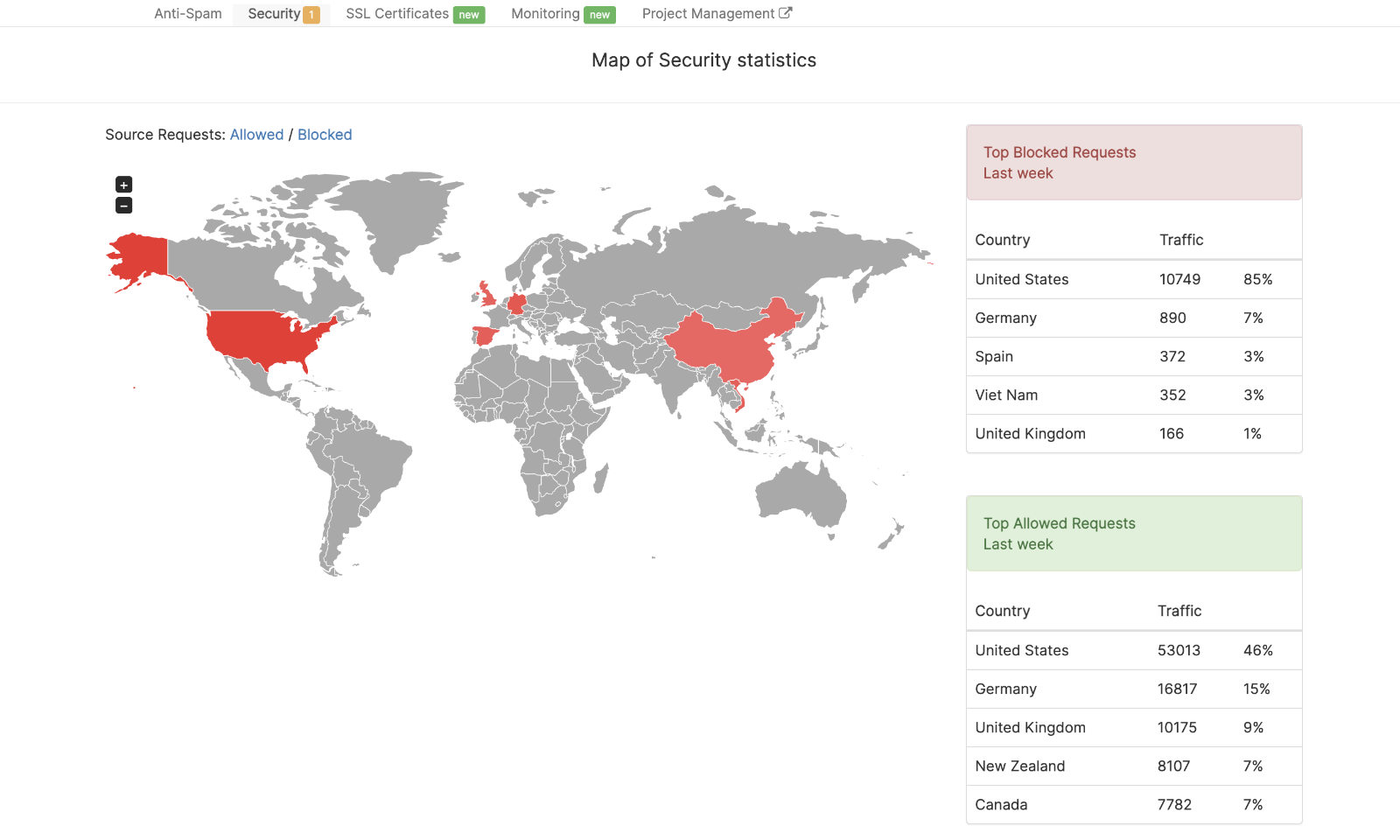
- Daily scans: The security plugin checks for malware and vulnerabilities
- Plugin monitoring: Detects outdated or risky plugins
- Suspicious activity alerts: Notifies immediately if something is wrong
- Real-life example: I caught the one hack mentioned because the plugin alert went off
Automated Backups: Be Ready for Anything
- Frequency: Weekly at minimum, daily for sites that change often
- Off-site storage: Not on the same server as your website
- Recommended by WordPress.org: Keep at least 3–5 recent backups in different locations
- Quick recovery: Determines whether you’re back online in an hour or rebuilding for days
“Security monitoring needs to run every day. WordPress sites are constantly scanned by bots looking for vulnerabilities.”
Consequences of Skipping Website Maintenance
Being systematic matters. If a site isn’t maintained properly, fixing problems becomes much harder, and downtime increases. Here’s what happens:
Troubleshooting Becomes Complex
- Hard to identify issues: Conflicts between outdated core, plugins, or theme
- Longer fixes: What could be five minutes turns into hours of detective work
- Infrastructure changes: Hosting updates, PHP, MySQL changes can break an unmaintained site
Website Lifespan Shortens
- End-of-life sites: Old plugins/themes create security risks
- Rebuild required: Sometimes the only solution is starting fresh
Sites Go Down During Updates
- Hosting updates: Servers upgraded regularly
- Compatibility issues: PHP or MySQL updates can stop your site
Security Vulnerabilities Remain
- Unpatched risks: Attackers scan for known vulnerabilities in outdated plugins
- Ongoing threats: Without monitoring, you won’t know your site is at risk
“If a site is not maintained properly, troubleshooting becomes much more complex.”
Why DIY Website Maintenance Often Fails
You Forget About It
- Short-lived reminders: Month one or two updates happen, then you forget
- Busy schedule: Month three onward, maintenance often neglected
- No oversight: Leads to forgotten passwords or missed critical updates
You Don’t Know What You’re Looking At
- Lack of experience: Hard to spot problems even if you log in regularly
- Systematic checks: I test everything after updates to catch issues immediately
Updating Everything at Once Causes Breakage
- Stacked updates: Ignored updates accumulate, causing conflicts
- No clear cause: Hard to know if a plugin, theme, or WordPress update broke it
- Time wasted: Can turn a quick fix into hours of troubleshooting
Hosting Infrastructure Confusion
- Server updates: PHP and MySQL versions change regularly
- Compatibility risks: Sites not maintained stop working unexpectedly
- Legacy issues: Old templated sites often fail to keep pace
No Backups When Disaster Strikes
- Automated backups: Weekly or daily depending on site activity
- Reduces downtime: Quick restore vs rebuilding for days
- WordPress.org recommendation: Backup before every upgrade
Professional Website Maintenance: What It Actually Includes
Weekly Updates: Core, Plugins & Theme
- Core updates: WordPress updated weekly
- Plugin updates: All plugins updated and tested
- Theme updates: Ensures site stability
- Post-update testing: Confirms nothing breaks
Daily Security Monitoring
- Malware scans: Security plugin checks every day
- Vulnerable plugin checks: Detects risks immediately
- Suspicious activity alerts: Immediate notification
Uptime Monitoring
- Real-time alerts: If your site goes down, I know immediately
- Minimizes downtime: Not days later when a customer reports it
Automated Off-Site Backups
- Stored safely: Separate server or location
- Frequent backups: Weekly minimum, daily for active sites
- Quick recovery: Reduces downtime in case of failure
Proper Troubleshooting
- Immediate response: Fix problems quickly
- Permanent solutions: Not just a temporary patch
- Systematic method: Step-by-step to prevent recurring issues
The Three Maintenance Packages
Website Maintenance (£150/month)
- Weekly WordPress, plugin, and theme updates
- Premium security and spam plugins included
- Uptime monitoring & security checks
- Automated off-site backups
- Email support with 48-hour response
- Best for businesses whose site doesn’t change often but needs security & reliability
Website Support (£400/month)
- Everything in Website Maintenance
- 3 hours per month for content updates
- Text changes, new pages, image updates
- Proactive improvement suggestions
- Best for businesses needing regular updates without hourly fees
Full Support (£700/month)
- Everything in Website Support
- 6 hours per month for ongoing improvements
- New landing pages & content restructuring
- Content & structure guidance to support search visibility
- Best for businesses actively growing their website without project management overhead
How to Actually Keep Your Website Maintained
Options for businesses in Kingston, Surrey, or South West London:
- Do it yourself: Weekly updates, backups, security checks. Realistically, very few do this reliably.
- Hire me: £150/month covers all updates, monitoring, backups, and immediate fixes with direct email support.
- Find someone else: Any professional designer should offer packages — check what’s included, how often they monitor, and response times.
Proper maintenance is critical — it keeps your website running, secure, and generating enquiries 24/7. Think of it like servicing your car: small, regular checks prevent expensive breakdowns.